Intercom CSAT in Slack, automatically.
Supportman brings every Intercom rating, weekly team report, and AI quality score into the Slack channels your team already has open. Installs in under 2 minutes, from $25/month.
Real-time CSAT notifications
Every Intercom rating lands in Slack the moment it happens, with the customer name, rating emoji and a link to the conversation thread.
Friday team reports
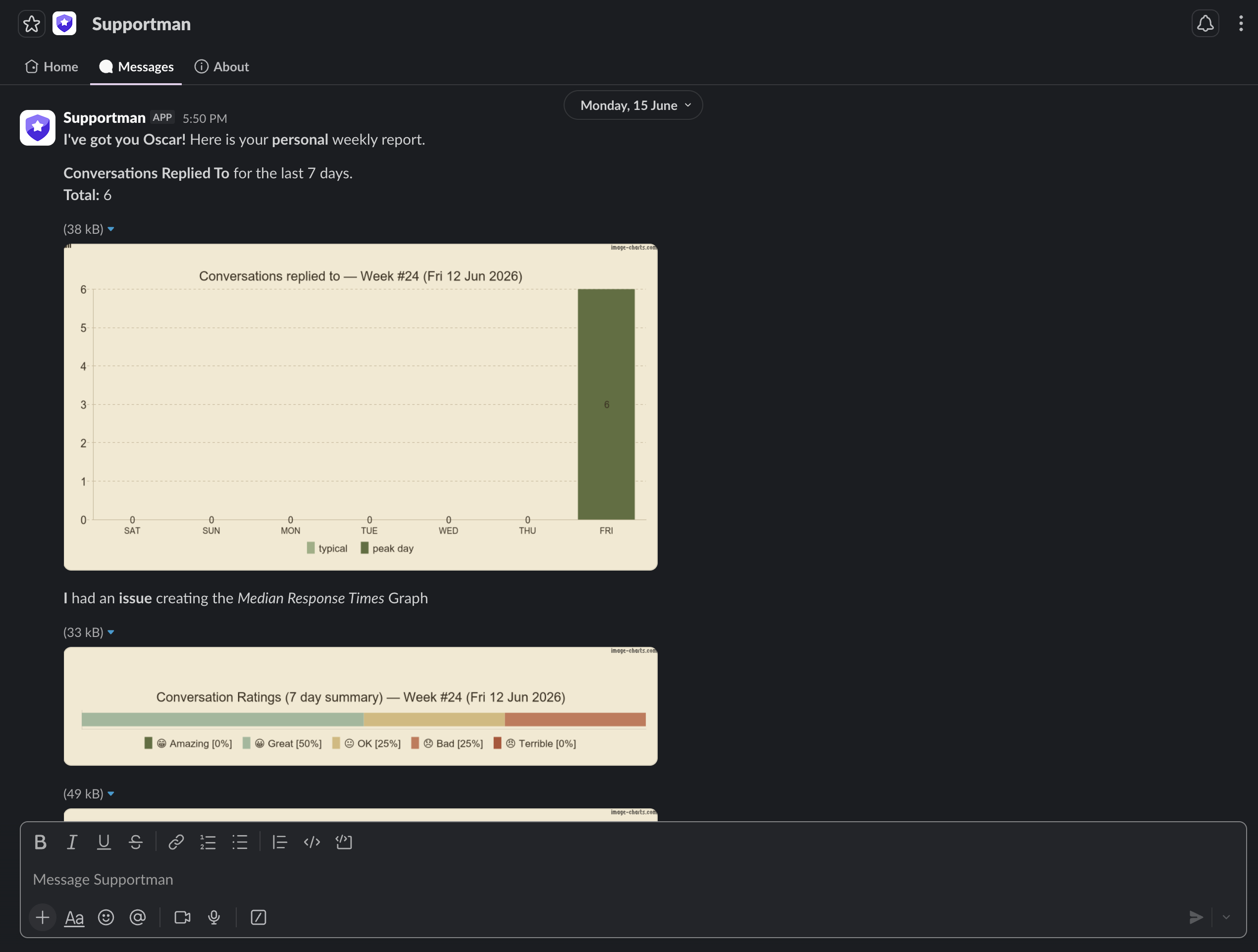
An automated weekly summary in your team channel: CSAT score, total conversations, top agents by rating and volume. No dashboard to check.
Per-agent DM reports
Each support agent gets a private Slack message with their own scores: CSAT, conversation count and rating breakdown, without a manager forwarding anything.
AI quality scoring
Every closed Intercom conversation gets an automated IQS score based on tone, accuracy, and resolution quality. Surfaced in the weekly report and per-agent DMs.
Per-emoji channel routing
Send 😞 and 😠 ratings to #escalations, send 😍 to #wins. Configure different channels for different emoji without any code.
Fin AI exclusion
Exclude conversations fully resolved by Intercom's Fin AI from your CSAT feed, so your team score reflects human performance only.
chat:write- To post CSAT notifications and reports into your chosen channels.
channels:read- To let you select which channel receives each type of message.
users:read- To send per-agent DM reports to each individual agent.
Supportman does not read your Slack messages, access message history, or store Slack user data beyond the workspace ID needed for delivery.
- What does the Supportman Slack app do?
- Supportman connects to your Intercom workspace and posts CSAT rating notifications, weekly team reports, and per-agent DM summaries directly to Slack. It also provides AI quality scoring on every closed Intercom conversation.
- How do I install Supportman for Slack?
- Connect Intercom at supportman.io. Once connected, you'll authorise the Slack integration and pick your channels. Setup takes under 2 minutes, no engineering required.
- Does Supportman require Intercom to work?
- Yes. Supportman is purpose-built for Intercom. It reads your Intercom CSAT ratings and conversation data and surfaces them in Slack.
- What Slack permissions does Supportman need?
- Supportman requests: chat:write (to post messages), channels:read (to let you select a channel), and users:read (for per-agent DM reports). It does not read your Slack messages.
- How much does Supportman cost?
- Pricing is per user: $5 per user per month for the Slack notification loop, $15 per user for AI evaluations, CSAT prediction, approvals and the dashboard. Billed annually with two months free; minimum $25/month. Free trial, no credit card required.
Questions about the Supportman Slack app? Email us at team@supportman.io . We respond within one business day.
Privacy Policy · Terms of Service · Supportman is independent, not affiliated with Slack Technologies or Intercom.